
Choose what you sell
Prepare the call for your business.
The same carrier record can support several conversations. Choose your business to see which records to review, what to ask, and what to verify.
For retail agents, wholesalers, MGAs, and underwriting teams.
Find trucking accounts worth a conversation.
Records to review
- Estimated renewal windows from filing anniversaries
- Observed insurer and coverage-filing changes
- Fleet size, operating authority, and published safety records
A reason to start the conversation
Use an estimated renewal window or a filing change to ask whether the account is ready for a coverage review. Confirm the actual renewal date and current coverage with the carrier.
Check the dates and confirm the need
Renewal windows are estimates, not confirmed dates. Filing changes describe the public record; they do not establish buying intent. Check the dates and missing-data notices in the report.
For factoring companies and freight-finance sales teams.
Start the conversation as a carrier gets established.
Records to review
- First observed authority-grant date
- Current reported fleet size and operating status
- Available cargo and carrier contact details
A reason to start the conversation
Use a recent first authority grant to ask how the carrier handles invoicing and payment terms. Establish whether factoring is relevant before discussing an offer.
Check the dates and confirm the need
Authority age comes from the earliest retained granted action across available feeds. Confirm current authority and the carrier’s operating history. DOT Intel does not show receivables, cash flow, or an existing factoring contract.
For fuel-card representatives and driver recruiters.
Put a reported fleet change into the next call.
Records to review
- Reported power-unit changes within retained snapshots
- Reported driver-count changes
- Current fleet size, cargo, and operating location
A reason to start the conversation
Fuel-card teams can ask whether the fleet’s fuel program still fits. Recruiters can ask about hiring plans after an observed fleet increase. Verify the change and the need with the carrier.
Check the dates and confirm the need
Snapshots generally retain a 90-day change window and a latest-per-carrier baseline. Reported counts can lag operations or reflect corrections. An increase does not prove a purchase or an open driver position.
For ELD and telematics sales teams.
Prepare a useful conversation about hours-of-service records.
Records to review
- Published hours-of-service violations
- Driver out-of-service findings
- Fleet size and available inspection detail
A reason to start the conversation
Review the dated HOS findings, then ask how the carrier manages logs, driver training, and its current ELD setup. Use the record to prepare questions about the operation.
Check the dates and confirm the need
Published inspection and violation records can lag. An HOS violation does not identify the installed ELD, prove a product failure, or establish a replacement need. Check the event dates and available detail.
For safety consultants and DOT compliance firms.
Make the compliance conversation specific to the record.
Records to review
- Published vehicle-maintenance violations
- Vehicle and driver out-of-service findings
- Safety rating and inspection history where available
A reason to start the conversation
Use dated findings to ask about maintenance controls, driver files, and corrective work. Confirm what has already been addressed before proposing support.
Check the dates and confirm the need
Historical findings do not establish that a problem remains unresolved. Missing records are not evidence of a clean record. Review source dates, inspection detail, and the carrier’s explanation.
FMCSA records describe reported operations and dated events. They do not confirm a need to buy. Available detail and freshness vary by carrier and source; inspect the dates in each report.
See how DOT Intel uses FMCSA recordsSee what you can use
One report to prepare the account conversation.
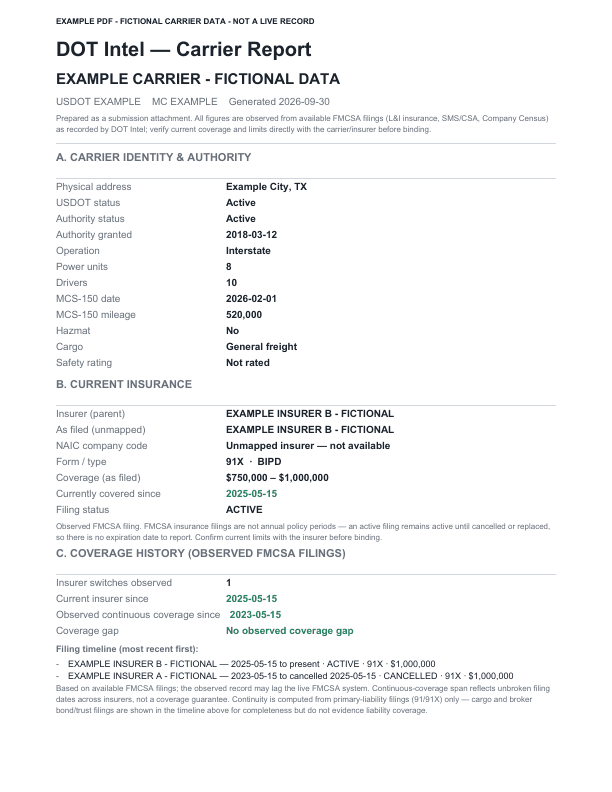
Open the example before creating an account. See how fleet, authority, insurance history, and published safety information come together in a carrier report.
Observed records and DOT Intel estimates are labeled separately. Check the source dates and limitations, then verify the account's current circumstances with the carrier.
Example PDF · fictional carrier data
This example illustrates the report format. It makes no claims about a real carrier or customer outcome.
For insurance teams
Use the evidence for the work in front of you.
The account stays the same. The questions change with your role and the next conversation.
Producers and agency owners
Turn a prospect list into prepared conversations.
You know the states and fleet sizes you want to work. You need enough account context to decide who to call and what to ask.
- How to use DOT Intel
- Filter carriers, open the report, and review fleet details, observed insurance history, and estimated renewal timing. Save the accounts you want to work and prepare questions about changes in the record.
- What to do next
- Confirm the insured's actual renewal date, operations, and current coverage during the conversation.
Wholesalers and MGAs
Give the next submission a clearer account story.
A trucking account arrives with an application and supporting files. You need to understand its public record before taking the next step with a market.
- How to use DOT Intel
- Review authority, fleet, filing history, and available safety information together. Keep the carrier report alongside the application, schedules, and loss runs when preparing the account for review.
- What to do next
- Resolve missing or conflicting details with the retailer or insured, and confirm each market's current requirements directly.
Underwriting teams
Review the public record before requesting more information.
You need to reconcile the submitted account with fleet, authority, insurance, and published safety information.
- How to use DOT Intel
- Use the report to review available records and their dates in one place. Follow observed changes and inspect the missing-data notices before deciding which questions need an answer.
- What to do next
- Use your underwriting process to evaluate the application and supporting evidence. DOT Intel supplies research for that review.
Agency leaders and territory teams
Choose where to focus the next round of research.
You want a clearer view of trucking-insurance activity in a state or fleet-size segment before assigning prospecting work.
- How to use DOT Intel
- Compare observed insurer filing activity and source periods, then investigate individual accounts. Use the findings to shape producer lists and prepare conversations with carrier representatives.
- What to do next
- Confirm market availability and requirements with the carrier. Filing activity alone does not establish whether it will quote an account.
Use the report with the tools you already have.
Keep your existing CRM and agency workflow. DOT Intel's Watchlists, Pipeline, Submission Desk, and verified-domain email are supporting options when you want to organize the follow-up inside DOT Intel.
Start with a free account and no card. Your first 100 distinct carrier records share one lifetime allowance, with no monthly reset.